
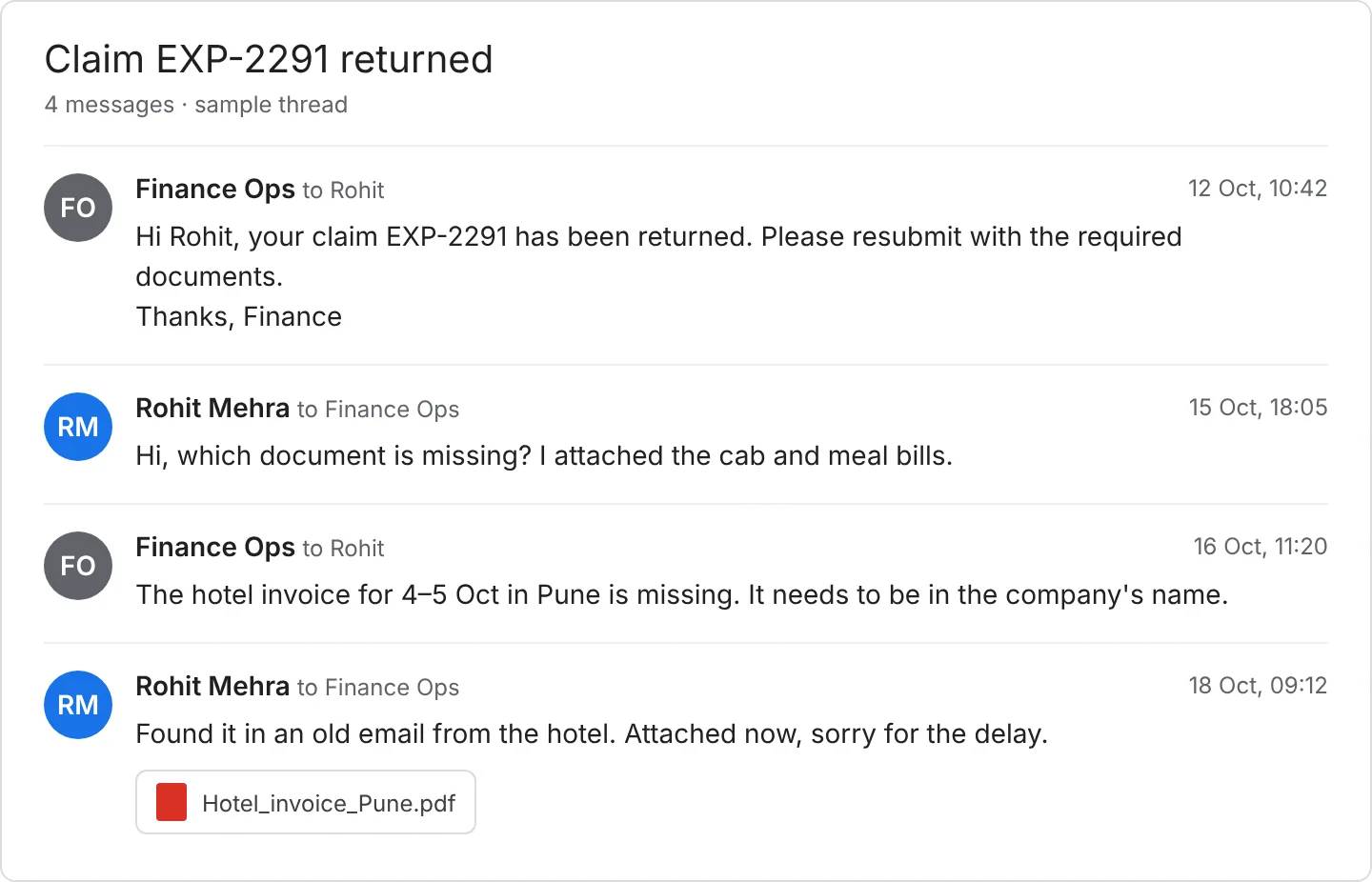
An employee submits a two-day client trip on the 3rd. By the 28th, the claim has passed through a reporting manager who was travelling, a finance executive who noticed the hotel invoice was missing, and a second round where the employee finally dug it out of an old email. It gets paid with the month's payroll, three weeks after anyone last thought about it.
Nobody in that chain did anything unreasonable, which is exactly why late reimbursement is so hard to fix. The delay isn't one person's mistake. It's built into how the claim moves.
This post looks at where the time actually goes in an employee reimbursement process, what a cleaner version looks like, and what to check if you're weighing expense reimbursement software. It's written for finance teams handling a few hundred claims a month or more, where "we'll sort it at month-end" has stopped working.
Where the time actually goes
In most workflows, a claim spends more time waiting between steps than being worked on. In an Indian Travel & Expense workflow, it usually sits in four places.
The submission itself. The receipt is blurry or missing, the category is wrong, the project code is blank, or the trip dates don't match the travel request. Finance sends it back, the employee fixes it a week later, and the clock restarts.
Approval. The reporting manager is on the road, or nobody is sure whether a regional head or the department head signs off above a certain amount. With no delegate and no deadline, the claim waits for the one person who can move it.
Finance review. Someone compares the claim against the policy, checks for duplicates, and confirms the invoice's tax details. Done by hand against a PDF policy, this is slow and inconsistent. Two executives can treat the same hotel bill differently.
Payout. Even an approved claim often waits for the next payroll run or the next weekly batch. The employee sees "approved" and still has no money.
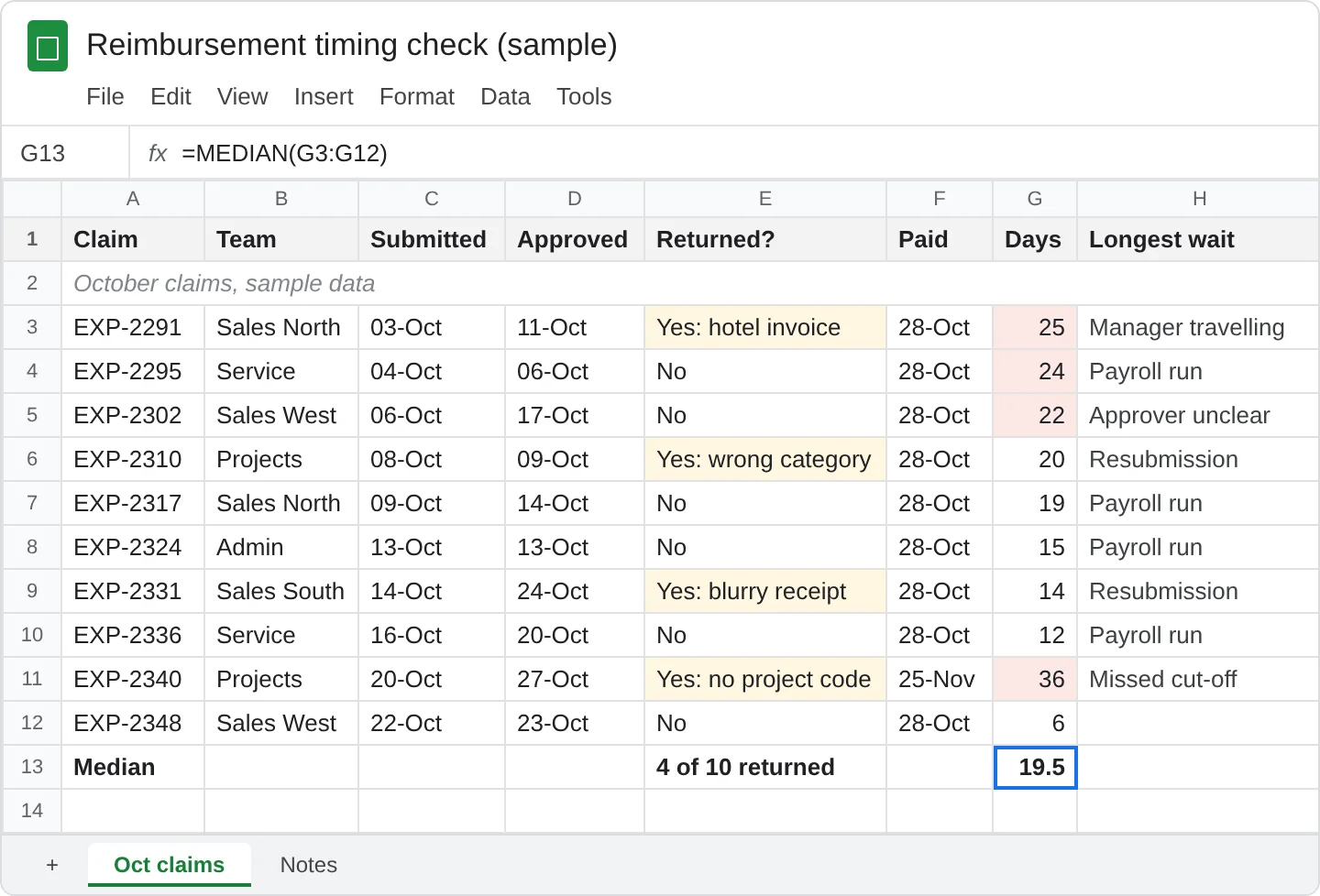
Before you change anything, pull ten recent claims and write down the date each one moved from step to step. You'll likely find the hands-on work was a small share of the elapsed time and the rest was waiting. That tells you whether your problem is bad submissions, slow approvers or slow payouts, and those need different fixes.
What a cleaner reimbursement process looks like
The fix is rarely "approve faster". It's moving the checks earlier so fewer claims bounce, and making each handoff visible so nothing sits unnoticed. A workable flow looks like this:
- Capture at the moment of spend. The employee photographs the receipt on their phone, and the details are read from it, instead of being typed in from memory two weeks later.
- Check against policy at submission. If a meal is over the limit or a receipt is missing, the employee finds out while they still remember the trip, not after finance has queued the claim.
- Route approval with a named delegate and a deadline. When the reporting manager doesn't act within the window, the claim moves to the delegate, or at least gets escalated.
- Send finance only the exceptions. Claims that pass every rule shouldn't need a person to re-read them. Executives spend their time on the ones that don't.
- Pay on a fixed rhythm and show the status. Whether it's weekly or fortnightly, employees should be able to see where their claim is without messaging finance.
None of this requires software to start. A shared checklist, a submission window, and a delegate list will remove a surprising amount of friction. Software earns its place when volume makes those rules too tedious to enforce by hand.
Policy rules that cut the back-and-forth
A lot of rejected claims come from a policy that leaves room to guess. Tightening a few rules removes most of the second rounds, and you can do it before you change any tool.
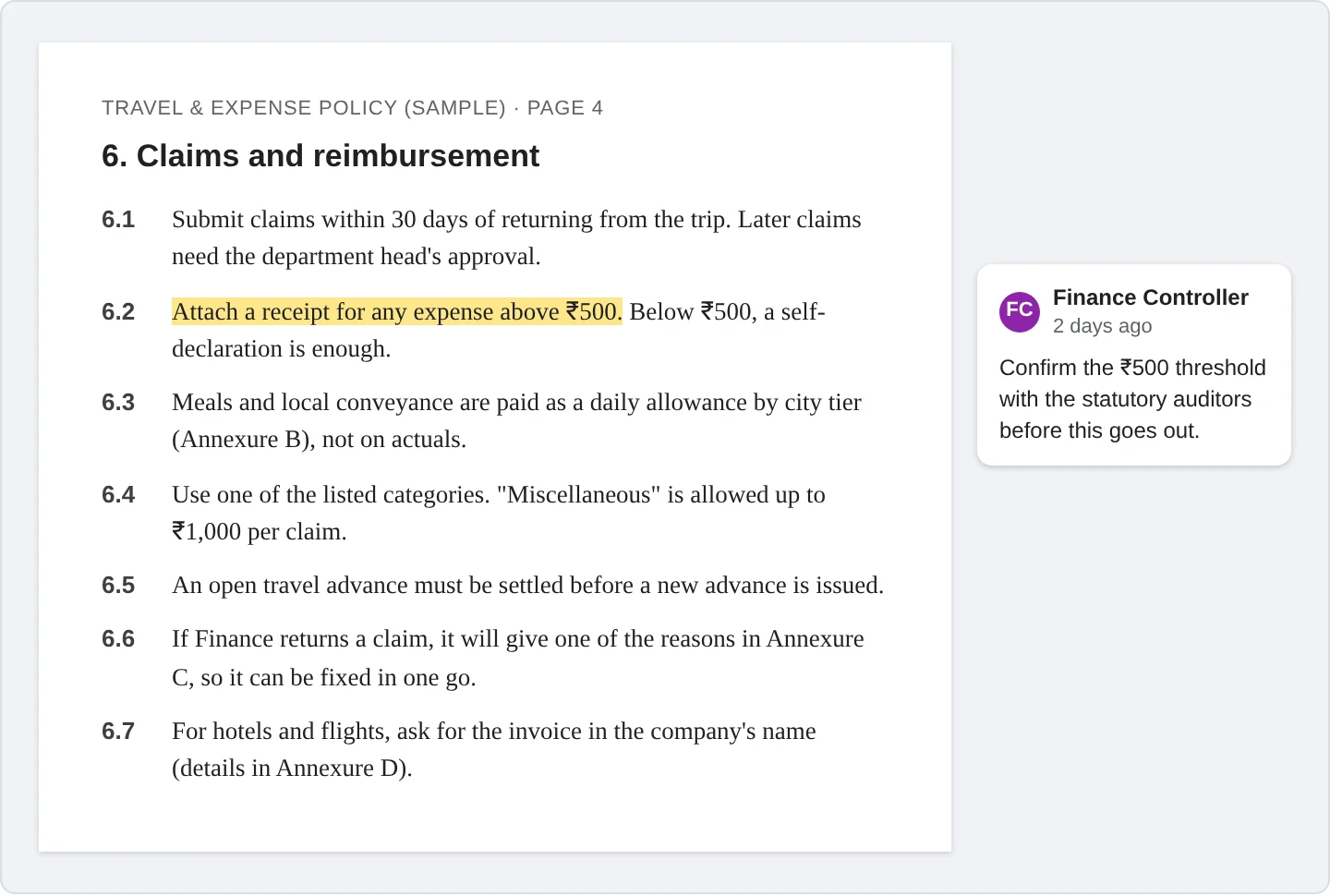
- A submission window you will enforce. Thirty days, forty-five, whatever suits you. What matters is that it applies to everyone, including senior staff, and that employees know about it before the deadline passes.
- A receipt threshold. Decide the amount below which a self-declaration is enough and above which a receipt is required. Set the number with your statutory auditors, not in isolation, because they may have views on what evidence they accept.
- Per diems where actuals make no sense. For meals and local conveyance, a fixed allowance avoids the argument over every bill.
- A closed list of categories. Allow "miscellaneous" only up to a small limit. Anything larger should fit a named category.
- Advances settled before the next one. An open advance should block a new one until the previous trip is reconciled.
- A fixed set of rejection reasons. When finance returns a claim, the employee should see exactly what to fix, in one round, not a vague "please resubmit".
- Tax invoice requirements written down. Where input tax credit is in play, ask your tax team which categories need an invoice in the company's name, and put that in the policy so employees collect it at the time.
Write the exceptions path in the same document: who can approve a one-off breach, and what they need to record. Otherwise exceptions happen anyway, just without a trail.
What to look for in expense reimbursement software
If you do decide a tool is worth it, a few questions separate the ones that remove work from the ones that move it somewhere else.
Does the receipt get read, or retyped? Photo capture is only useful if the amount, date and vendor come out of it without the employee typing them in again.
When do policy checks run? The useful answer is "at submission". If checks only run after approval, finance is still doing the rework.
What happens when an approver doesn't respond? Look for delegates and escalation, not just a notification.
Can employees see where their claim is? If they can't, they will ask finance, and that is the work you were trying to remove.
How are tax details handled line by line? Fields such as GST and TDS should be captured with the claim, not reconstructed by finance afterwards.
How does it reach your ERP? Ask to see the posting with your own chart of accounts and your own entities, not a screenshot.
What does the audit trail show? Who submitted, who changed what, who approved and when.
When you run a demo, bring ten real claims, including a few messy ones with bad photos and odd categories. A demo on clean sample data tells you almost nothing.
ProXpense's expense module is built around this flow: receipts are read from a photo, policy and duplicate checks run before a claim reaches an approver, and card transactions are matched against claims. At Indocount, expense processing time fell from 40 hours a month to 0.08 hours (read the customer story).
If you'd like to see how your own claims would run, book a 30-minute demo on your own claims.
Questions finance teams ask
How long should an employee reimbursement take?+
There's no standard that applies everywhere. Set an internal target you can actually measure, such as "approved claims are paid in the next weekly run", and track the median number of days from submission to payout. That number will tell you more than any benchmark.
Should reimbursements go through payroll or a separate payment run?+
Payroll is simple when the cycle is monthly and claim volume is low. If employees regularly wait more than a couple of weeks for approved money, a separate weekly run is usually worth the extra step.
Do we need a receipt for every claim?+
That's a policy decision. Many teams set an amount below which a self-declaration is enough and require receipts above it. Agree the figure with your statutory auditors and tax advisor before you write it into the policy.
What's the difference between expense reimbursement software and expense management software?+
Reimbursement software covers the path from claim to payout. Expense management is wider and usually adds policy control, card and travel spend, reporting and ERP posting. If claims are your main pain, start there, but check whether the tool can grow into the rest.
What should we fix first?+
Start with submissions. Claims that bounce back for missing or wrong details are the most avoidable delay, and the ten-claim exercise from earlier will show you how many of yours do.